
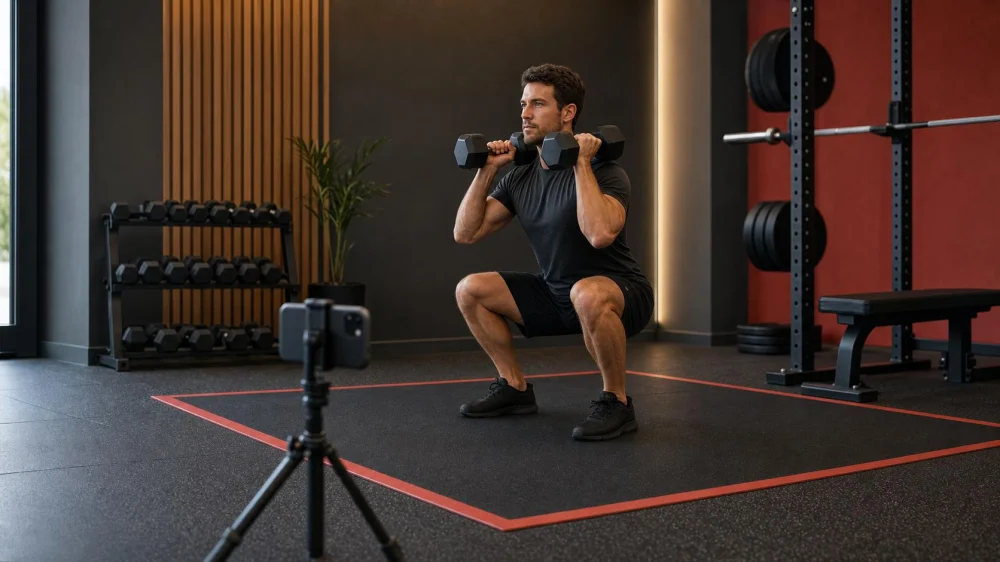
Record Your Workout Form Without Filming Other People
Table of contents
Quick answer
Ask whether recording is permitted, choose a quiet station, and point the camera tightly at your own lifting area. Keep mirrors, walkways, changing areas, and other members out of frame. Mount the phone securely where it cannot become a trip hazard. Record one normal set, review only a few visible checkpoints, and delete any clip that accidentally identifies someone else.
Femme / femme hackensack photos
HackensackBergen CountyNew Jersey
34 Commerce Way, Hackensack, NJ 07601, USA
Check the gym's camera policy first
A membership does not automatically grant permission to film. Gyms can set rules for cameras, tripods, lighting, coaching sessions, livestreaming, and commercial content. Some facilities allow a quick form clip on the workout floor but prohibit all recording in locker rooms, bathrooms, treatment rooms, childcare areas, or staff-only spaces.
Read the posted policy or ask the front desk before setting up. Explain that the clip is for your own technique review, where you plan to stand, and how long recording will take. If staff say no, use a mirror, ask a trainer to observe, or record later in a private setting. Do not argue that other members are filming too.

Club Pilates / club pilates hudson
118 W Streetsboro St Room 25, Hudson, OH 44236, USA
Choose a low-traffic recording space
The right spot protects both privacy and safety. Look for a station with a plain wall or empty corner behind you, enough room for the complete movement, and no doorway or main aisle crossing the shot. Avoid pointing toward cardio rows, group classes, check-in desks, or mirrors that reflect a much wider area than the camera appears to capture.
Wait if another person is using the adjacent station or would be trapped in frame. A short clip is not worth blocking equipment, narrowing an emergency route, or making someone feel watched. Off-peak hours can help, but the same rules still apply.
Frame only the movement you need
Use the narrowest useful view. For many standing movements, a front or side angle that includes your head, hands, feet, and the equipment is enough. A diagonal view can show several joints, but it also captures more background. Move the camera closer or use a plain backdrop rather than using digital zoom from across the room.
Check the preview for reflections before recording. Glass, mirrors, polished machines, and even a dark phone screen can reveal people outside the obvious frame. Turn off ultrawide mode when it adds unnecessary background. Do not record audio conversations you do not need.
Secure the phone outside the lifting zone
Place the phone on a stable mini tripod or approved mount. It should not sit where a foot, plate, dumbbell, bar path, cable, or spotter may travel. Keep it out of aisles and away from moving machine parts. Never balance it on a weight stack, safety arm, unstable bottle, or another member's equipment.
Set the frame before picking up the working weight. Use a timer, remote, or short test clip so you do not rush between the phone and the lift. If the setup changes how you brace, unrack, spot, or bail out safely, move the camera or skip the recording.
Record one useful set
- Choose a familiar exercise and a manageable load rather than testing a maximum for the camera.
- Capture the setup, start position, repetitions, and safe return of the equipment.
- Perform the set normally; do not exaggerate range or slow the movement solely for the clip.
- Stop the camera promptly and free the station before reviewing a long video.
- Repeat only if the first angle truly missed the checkpoint you needed.
Federal physical-activity guidance recommends increasing activity gradually. A video review can support that approach, but it should not become a reason to add load, volume, or complexity faster than your current ability allows.
Review form without overcorrecting
Pick two or three visible questions before watching: Did the whole foot stay where intended? Did the bar or weight follow a repeatable path? Did the final repetitions change from the first? Compare like with like—same exercise, angle, load, and camera height—rather than judging yourself against a different lifter online.
A two-dimensional clip can distort joint angles and hide rotation, fatigue, pain, breathing, or pressure. Avoid diagnosing an injury from a frame-by-frame screenshot. If a movement causes sharp pain, dizziness, chest discomfort, unusual shortness of breath, or loss of control, stop and seek appropriate medical advice rather than filming more attempts.
For technical feedback, share the smallest necessary clip with a qualified coach through an agreed channel. Ask before posting another person's voice or image, even if they appear only in the background. Crop or blur is not a substitute for consent when someone remains identifiable.
Privacy and setup checklist
- Confirm the gym allows recording and tripods in that area.
- Keep locker rooms, bathrooms, childcare, and treatment spaces entirely off camera.
- Choose a plain background away from mirrors and traffic.
- Ask nearby members before they could enter the shot.
- Use a narrow frame and check every reflection.
- Secure the phone outside walkways, equipment paths, and your bailout space.
- Record a normal, manageable set instead of performing for the camera.
- Review promptly and delete clips that capture others without permission.
Limits and safety cautions
This guide offers general fitness and privacy practices, not legal, medical, or individualized training advice. Privacy laws, facility contracts, and recording policies vary by location. The gym's current rules and staff directions control whether and where you may film.
A phone video cannot assess every aspect of safe technique or determine why pain occurs. New exercisers, people returning after a long break, and those with chronic conditions or disabilities may benefit from asking a health professional or appropriately qualified trainer which activities and progressions fit their needs.
Frequently asked questions
Is it enough to blur people before posting?
Not always. Prevention is better: frame others out and ask permission before recording. Blurring can fail when clothing, voices, location, reflections, or context still identify someone.
Where should I place the camera for a squat?
A side or front-diagonal angle can show your full body, feet, depth, and weight path. Choose the angle that answers your specific question without expanding the frame into other stations.
Can I use a large tripod in a quiet gym?
Only if the facility allows it and the tripod does not block a walkway or lifting zone. A quiet moment can become busy quickly, so keep the footprint small and attended.
Should I livestream a form check?
Livestreaming increases privacy risk because you cannot inspect or edit the background first. A short local recording reviewed privately is easier to control.
Evidence and sources
- CDC: Overcoming Barriers to Physical Activity
- CDC: Steps for Getting Started With Physical Activity
- U.S. Office of Disease Prevention and Health Promotion: Physical Activity Guidelines
For camera permissions and member privacy, use your gym's current written policy and direct staff guidance as the primary source.
Conclusion and next steps
A useful form clip is small, intentional, and private. Confirm permission, create a tight frame with a stable phone position, record one controlled set, and review a few predetermined checkpoints. The best setup helps you learn without turning someone else's workout into your background content.

 Club Pilates5.0 (287 reviews)
 DTW Fitness5.0 (11 reviews)
 Yoga Room4.0 (16 reviews)
 Charlevoix Yoga5.0 (11 reviews)
 Power Life Yoga Barre Fitness - South Plaza4.0 (87 reviews)
 Semper FIt Boxing Club5.0 (120 reviews)
 How to Build Race-Specific Strength Workouts That Translate Directly to Faster Finishes This Fall
 The Runner’s Guide to Strengthening Hips and Glutes for Better Performance
 Science-Backed Tips for Improving Your Muscle Gain | Expert Fitness Advice
 Best Glute Activation Exercises Before Leg Day
 Best Exercises to Reduce Back Fat: Effective Workouts for a Toned Back
 Beginner’s Guide to Bodyweight Training for Fitness Success